OPTIMIZE TABLE
OPTIMIZE TABLE compacts small segments and blocks to improve query performance. To reclaim storage occupied by eligible historical data after compaction, use VACUUM TABLE.
Why Optimize?
Databend Data Storage: Snapshot, Segment, and Block
Snapshot, segment, and block are the concepts Databend uses for data storage. Databend uses them to construct a hierarchical structure for storing table data.
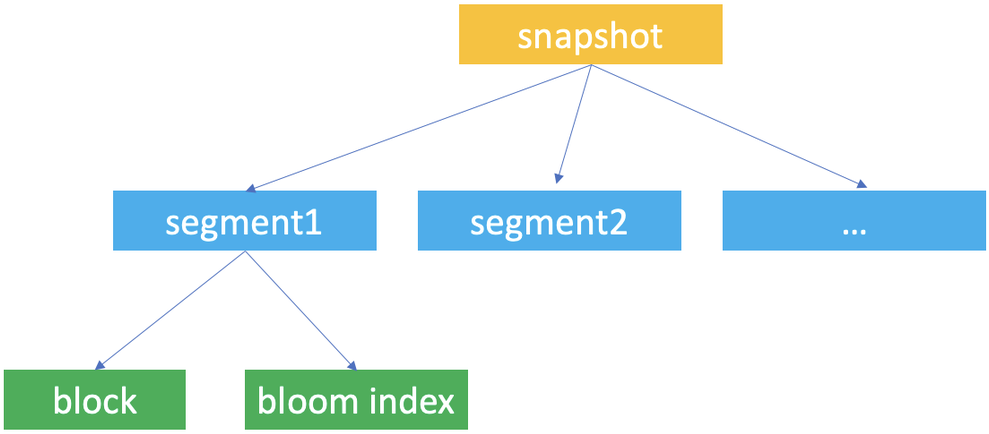
Databend automatically creates table snapshots upon data updates. A snapshot represents a version of the table's segment metadata.
When working with Databend, you're most likely to access a snapshot with the snapshot ID when you retrieve and query a previous version of the table's data with the AT clause.
A snapshot is a JSON file that does not save the table's data but indicate the segments the snapshot links to. If you run FUSE_SNAPSHOT against a table, you can find the saved snapshots for the table.
A segment is a JSON file that organizes the storage blocks (at least 1, at most 1,000) where the data is stored. If you run FUSE_SEGMENT against a snapshot with the snapshot ID, you can find which segments are referenced by the snapshot.
Databends saves actual table data in parquet files and considers each parquet file as a block. If you run FUSE_BLOCK against a snapshot with the snapshot ID, you can find which blocks are referenced by the snapshot.
Databend creates a unique ID for each database and table for storing the snapshot, segment, and block files and saves them to your object storage in the path <bucket_name>/<tenant_id>/<db_id>/<table_id>/. Each snapshot, segment, and block file is named with a UUID (32-character lowercase hexadecimal string).
| File | Format | Filename | Storage Folder |
|---|---|---|---|
| Snapshot | JSON | <32bitUUID>_<version>.json | <bucket_name>/<tenant_id>/<db_id>/<table_id>/_ss/ |
| Segment | JSON | <32bitUUID>_<version>.json | <bucket_name>/<tenant_id>/<db_id>/<table_id>/_sg/ |
| Block | parquet | <32bitUUID>_<version>.parquet | <bucket_name>/<tenant_id>/<db_id>/<table_id>/_b/ |
Table Optimizations
In Databend, it's advisable to aim for an ideal block size of either 100MB (uncompressed) or 1,000,000 rows, with each segment consisting of 1,000 blocks. To maximize table optimization, it's crucial to gain a clear understanding of when and how to apply various optimization techniques, such as Segment Compaction and Block Compaction.
- When using the COPY INTO or REPLACE INTO command to write data into a table that includes a cluster key, Databend will automatically initiate a re-clustering process, as well as a segment and block compact process.
Distributed Execution and Upgrade Compatibility
In a cluster, Databend distributes block compaction automatically. enable_distributed_compact is deprecated and has no effect. Setting it to 0 does not force local execution.
Older versions used the following setting to enable distributed compaction. Existing scripts can keep this statement, but new scripts do not need it:
SET enable_distributed_compact = 1;
auto_compaction_segments_limit accepts values from 2 to 128, inclusive. This setting limits the segments considered for automatic re-clustering after a write. Before an upgrade, check any scripts that set a larger value. Change those values to the supported range. This setting does not replace the LIMIT clause of a manual OPTIMIZE TABLE or ALTER TABLE ... RECLUSTER command.
Segment Compaction
Compact segments when a table has too many small segments (less than 100 blocks per segment).
SELECT
  block_count,
  segment_count,
  IF(
              block_count / segment_count < 100,
              'The table needs segment compact now',
              'The table does not need segment compact now'
    ) AS advice
FROM
  fuse_snapshot('your-database', 'your-table')
    LIMIT 1;
Syntax
OPTIMIZE TABLE [database.]table_name COMPACT SEGMENT [LIMIT <segment_count>]
Merges small segments into larger segments without rewriting data blocks.
COMPACT SEGMENT LIMIT n considers the newest input segments. The limit does not specify the number of merged or output segments. Segments that do not need compaction can remain unchanged.
Without LIMIT, Databend considers all segments in the current snapshot.
Repeated limited runs can leave older fragments untouched. Run COMPACT SEGMENT without LIMIT periodically when older segments also need compaction. These rules apply to COMPACT SEGMENT, not to block compaction.
Example
-- Check whether need segment compact
SELECT
  block_count,
  segment_count,
  IF(
              block_count / segment_count < 100,
              'The table needs segment compact now',
              'The table does not need segment compact now'
    ) AS advice
FROM
  fuse_snapshot('hits', 'hits');

+-------------+---------------+-------------------------------------+
| block_count | segment_count | advice                              |
+-------------+---------------+-------------------------------------+
|         751 |            32 | The table needs segment compact now |
+-------------+---------------+-------------------------------------+

-- Compact segment
OPTIMIZE TABLE hits COMPACT SEGMENT;

-- Check again
SELECT
  block_count,
  segment_count,
  IF(
              block_count / segment_count < 100,
              'The table needs segment compact now',
              'The table does not need segment compact now'
    ) AS advice
FROM
  fuse_snapshot('hits', 'hits')
    LIMIT 1;

+-------------+---------------+---------------------------------------------+
| block_count | segment_count | advice                                      |
+-------------+---------------+---------------------------------------------+
|         751 |             1 | The table does not need segment compact now |
+-------------+---------------+---------------------------------------------+
Limited compaction example
Each separate insert below creates a segment. The first compaction considers only the newest two segments. The unrestricted compaction can then merge the remaining older fragments.
CREATE TABLE compact_segment_latest_limit(a INT) BLOCK_PER_SEGMENT = 4;
INSERT INTO compact_segment_latest_limit VALUES (1);
INSERT INTO compact_segment_latest_limit VALUES (2);
INSERT INTO compact_segment_latest_limit VALUES (3);
INSERT INTO compact_segment_latest_limit VALUES (4);

OPTIMIZE TABLE compact_segment_latest_limit COMPACT SEGMENT LIMIT 2;

-- Expected counts: 3 segments, 4 blocks, 4 rows.
SELECT segment_count, block_count, row_count
FROM fuse_snapshot('default', 'compact_segment_latest_limit') LIMIT 1;

OPTIMIZE TABLE compact_segment_latest_limit COMPACT SEGMENT;

-- Expected counts: 1 segment, 4 blocks, 4 rows.
SELECT segment_count, block_count, row_count
FROM fuse_snapshot('default', 'compact_segment_latest_limit') LIMIT 1;

DROP TABLE compact_segment_latest_limit;
Block Compaction
Compact blocks when a table has a large number of small blocks or when the table has a high percentage of inserted, deleted, or updated rows.
You can check it with if the uncompressed size of each block is close to the perfect size of 100MB.
If the size is less than 50MB, we suggest doing block compaction, as it indicates too many small blocks:
SELECT
  block_count,
  humanize_size(bytes_uncompressed / block_count) AS per_block_uncompressed_size,
  IF(
              bytes_uncompressed / block_count / 1024 / 1024 < 50,
              'The table needs block compact now',
              'The table does not need block compact now'
    ) AS advice
FROM
  fuse_snapshot('your-database', 'your-table')
    LIMIT 1;
We recommend performing segment compaction first, followed by block compaction.
Syntax
OPTIMIZE TABLE [database.]table_name COMPACT [LIMIT <segment_count>]
Compacts the table data by merging small blocks and segments into larger ones.
-
This command creates a new snapshot (along with compacted segments and blocks) of the most recent table data without affecting the existing storage files, so reclaim storage from eligible historical data with VACUUM TABLE after compaction.
-
Depending on the size of the given table, it may take quite a while to complete the execution.
-
The option LIMIT sets the maximum number of segments to be compacted. In this case, Databend will select and compact the latest segments.
-
Databend will automatically re-cluster a clustered table after the compacting process.
Example
OPTIMIZE TABLE my_database.my_table COMPACT LIMIT 50;
To compact and then clean up eligible historical files:
OPTIMIZE TABLE my_database.my_table COMPACT;
VACUUM TABLE my_database.my_table;